
CLI Over HTTPS Part 2: Proving It
Table of Contents
In Part 1, I argued that SSH is a slow transport for network automation at scale and that HTTPS is fundamentally faster. Round-trip analysis and back-of-napkin math are useful, but they’re not proof. This post is the proof.
I built clibench, a dual-protocol network device emulator and benchmark client that measures the difference at realistic latencies sourced from Verizon’s published backbone measurements.
Design Constraints
For the comparison to mean anything, the test has to be fair. That means:
- Same device, same commands, same output. Both transports hit the same
device.Devicestruct. The only variable is how the command arrives and how the response leaves. - Same latency for both. Delay is injected at the TCP connection level, not the application level. Both SSH and HTTPS experience identical network conditions.
- Realistic latency values. No made-up numbers. Every profile is sourced from published measurements.
- Multiple modes per transport. SSH gets tested with fresh connections and with connection reuse (ControlMaster-style). HTTPS gets tested with fresh connections, keep-alive, multi-command batching, and config push. Each mode represents a real-world usage pattern.
Architecture
clibench is written in Go. The project has nine packages:
| |
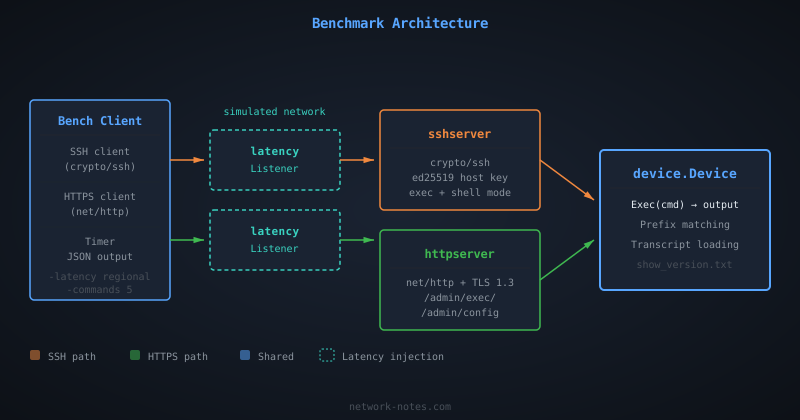
The benchmark client embeds its own server. No separate process needed. Latency is injected at the kernel level using Linux tc netem, applied per-port on the loopback interface so both SSH and HTTPS experience identical network conditions.
The Shared Command Engine
Both servers use the same device.Device:
| |
Command transcripts are plain text files loaded from a directory. The filename convention maps to the command: show_version.txt becomes show version. Templates support {{.Hostname}} substitution. This follows the same pattern as CiSSHGo, which I wrote about recently.
The SSH Server
The SSH side uses Go’s crypto/ssh package with an ed25519 host key generated at startup. It supports both exec mode (ssh host "show version") and interactive shell sessions with prompt rendering and command matching. The benchmark client tests both, since real-world tools are split: libraries like Go’s x/crypto/ssh use exec mode, while Netmiko, Ansible, and Scrapli use PTY/shell.
| |
The HTTPS Server
The HTTPS side generates a self-signed P-256 ECDSA certificate at startup (negotiating TLS 1.3 with TLS_AES_128_GCM_SHA256) and exposes the same endpoints as the Cisco ASA HTTP interface:
GET /admin/exec/show+version. Single command, URL-encodedGET /admin/exec/cmd1/cmd2/cmd3. Multiple commands, slash-separatedPOST /admin/config. Bulk commands, newline-delimited body
Authentication is HTTP Basic over TLS, matching the ASA’s behavior.
| |
The Benchmark Client
The client calls both transports with the same commands and measures wall-clock time. The key difference is visible in the code: SSH requires connection setup, auth, channel open, and per-command exec requests. HTTPS is a single HTTP call:
| |
Latency Injection
Latency is injected using Linux tc netem on the loopback interface, configured entirely via the vishvananda/netlink library, the same netlink library used by Docker and Kubernetes.
The tool sets up a prio qdisc with per-port u32 filters so that traffic to the SSH and HTTPS server ports gets the configured one-way delay, while other loopback traffic is unaffected.
This requires root or CAP_NET_ADMIN, the same requirement as most raw-socket networking tools.
Netlink qdisc setup code (click to expand)
| |
Because netem operates at the kernel’s network stack, it captures real TCP behavior: Nagle’s algorithm, delayed ACKs, TCP window scaling, and proper per-packet delay.
Every packet in both directions, client-to-server and server-to-client, experiences the configured delay.
This is more accurate than userspace delay injection, which can’t distinguish between logically separate protocol exchanges that happen to be coalesced into a single write.
A -userspace flag is available as a fallback for environments where root isn’t available, but the published numbers all use tc netem.
Latency Profiles
Each profile corresponds to a real network path, sourced from Verizon Enterprise’s monthly IP latency statistics (March 2026). The simulated RTT values are rounded for readability; the Verizon measured column shows the exact source data:
| Profile | Simulated RTT | Real-world path | Verizon measured RTT |
|---|---|---|---|
local | 0ms | Co-located | Baseline |
campus | 2ms | Same data center | AWS/Prisma: 1-2ms |
regional | 30ms | US backbone | 29.9ms |
continental | 70ms | NYC ↔ London | 70.2ms |
intercontinental | 150ms | US ↔ Hong Kong | 145.5ms |
transpacific | 175ms | NA ↔ Taiwan | 175.2ms |
Benchmark Modes
The client tests these scenarios across both transports (plus a multi-command GET mode when running more than one command per iteration):
SSH Exec Modes
SSH exec mode opens a channel, sends a command, and reads the output. This is what Go’s x/crypto/ssh, Paramiko’s exec_command(), and OpenSSH’s ssh host "cmd" use. Each command gets its own channel.
| Mode | What it measures |
|---|---|
ssh/fresh-conn | Full SSH lifecycle per iteration: TCP + handshake + auth + channel + exec |
ssh/reuse-conn | One SSH connection shared across all iterations (ControlMaster-style) |
ssh/batch-exec | Multi-line command string over a single exec session |
SSH PTY/Shell Modes
SSH PTY mode opens an interactive shell with a pseudo-terminal, sends commands as keystrokes, and detects the prompt after each command.
This is what Netmiko, Ansible network_cli, Scrapli, and most real-world network automation tools use.
Many network devices don’t support exec mode properly, and automation tools need prompt detection, pagination control, and mode transitions.
(Part 1 called this the “screen-scraping tax”, the cost of parsing an unstructured byte stream.)
The PTY benchmark includes session preparation (sending terminal length 0 and terminal width 511 before the first command) and per-command echo verification (reading until the echoed command appears, then reading until the prompt), matching the protocol-level behavior common to all major tools.
| Mode | What it measures |
|---|---|
ssh/pty-fresh | Full SSH lifecycle + PTY + shell + session prep + commands with echo verification |
ssh/pty-reuse | Shared connection, new PTY/shell per iteration with session prep |
HTTPS Modes
| Mode | What it measures |
|---|---|
https/fresh-conn | New TCP + TLS handshake per iteration (DisableKeepAlives: true) |
https/keep-alive | Single TCP + TLS connection reused across all iterations (default HTTP behavior) |
https/batch-post | All commands in one POST body (/admin/config) |
https/multi-cmd | All commands in one GET request (ASA /admin/exec/cmd1/cmd2 syntax) |
Each mode runs N iterations, each executing 5 show version commands. The client reports min, max, average, p50, p95, and standard deviation.
Running It Yourself
| |
clibench embeds its own server. No separate process needed. Non-local profiles require root (or CAP_NET_ADMIN) for tc netem on the loopback interface. Output is JSON.
Results
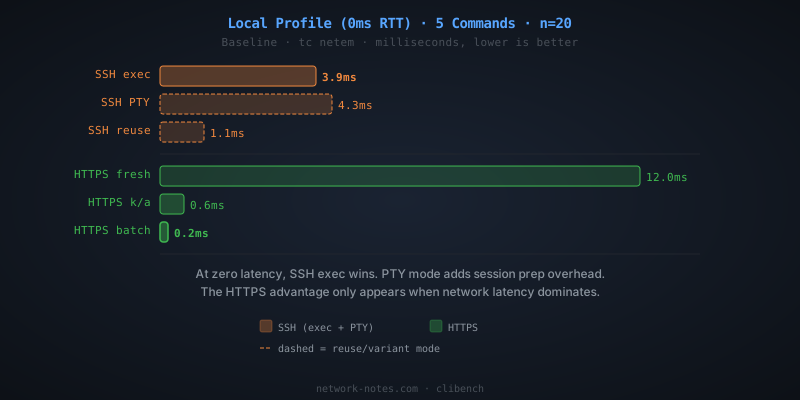
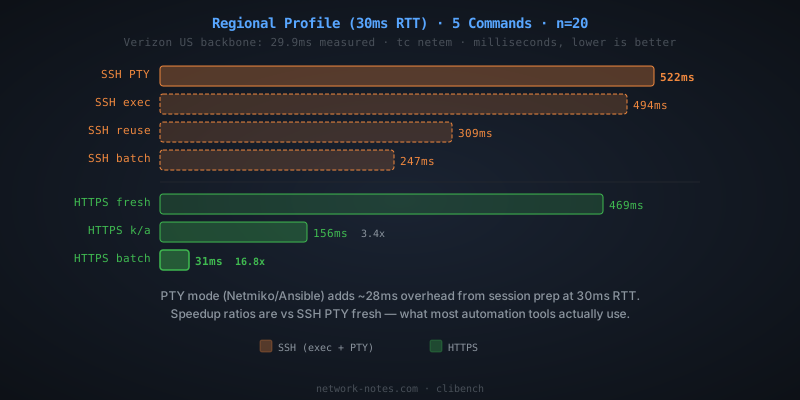
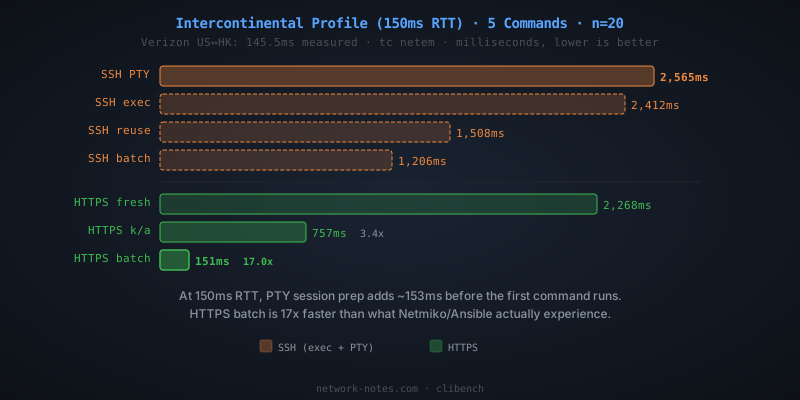
5 commands per iteration, all times in milliseconds (average of 20 iterations). Latency injected via tc netem on the loopback interface.
At zero latency, SSH exec mode is the fastest option. There’s no round-trip penalty, and SSH’s binary framing has less per-message overhead than HTTP headers + TLS:
The moment real network latency enters the picture, the result flips. At 30ms RTT, a US backbone path per Verizon’s March 2026 measurements, HTTPS batch is 16.8x faster than SSH PTY fresh and 15.9x faster than SSH exec fresh-conn:
At intercontinental distances (US ↔ Hong Kong, 150ms RTT), SSH PTY fresh takes 2.6 seconds for 5 commands. SSH exec fresh takes 2.4 seconds. HTTPS batch does it in 151ms:
Exec Mode vs PTY/Shell Mode
The PTY overhead comes from session preparation (terminal length 0, terminal width 511) and per-command echo verification. At higher latencies, this adds up:
| Profile | RTT | SSH exec fresh | SSH PTY fresh | PTY overhead |
|---|---|---|---|---|
| local | 0ms | 3.9ms | 4.3ms | +0.4ms |
| campus | 2ms | 40ms | 42ms | +2ms |
| regional | 30ms | 494ms | 522ms | +28ms |
| continental | 70ms | 1,144ms | 1,213ms | +69ms |
| intercontinental | 150ms | 2,412ms | 2,565ms | +153ms |
The PTY overhead scales linearly with RTT because the session prep commands add roughly one extra round trip of overhead before the first real command runs. At 150ms RTT, that’s ~150ms of pure protocol overhead. And this is the best case. Real devices add processing time, ANSI escape codes, and prompt detection regex that the emulator doesn’t capture.
Speedup vs SSH PTY fresh (what most tools actually use)
| Profile | RTT | SSH exec fresh | SSH reuse | HTTPS keep-alive | HTTPS batch |
|---|---|---|---|---|---|
| local | 0ms | 1.1x | 3.9x | 7.2x | 19.1x |
| campus | 2ms | 1.1x | 1.8x | 3.3x | 16.3x |
| regional | 30ms | 1.1x | 1.7x | 3.3x | 16.8x |
| continental | 70ms | 1.1x | 1.7x | 3.4x | 16.3x |
| intercontinental | 150ms | 1.1x | 1.7x | 3.4x | 17.0x |
What the Numbers Say
All results are from 20 iterations per profile. Variance was low, at regional (30ms), SSH exec fresh-conn p50 was 492ms with p95 at 508ms.
At zero latency, SSH exec wins. When there’s no network delay, TLS handshake overhead dominates. SSH exec fresh-conn takes 3.9ms; HTTPS fresh-conn takes 12.0ms. But PTY mode is already slower at 4.3ms due to session prep overhead. The reuse modes tell a different story: SSH exec reuse (1.1ms) and HTTPS keep-alive (0.6ms) are both sub-millisecond. Once the handshake is amortized, both protocols are fast.
Most automation tools don’t use exec mode. As covered above, they use PTY/shell mode for prompt detection, pagination control, and mode transitions. The PTY numbers are what your automation actually experiences.
SSH reuse helps, but not enough. Sharing one SSH connection (the ControlMaster pattern) eliminates the handshake cost, but each command still requires its own round trips. The improvement is consistent at ~1.7x. Real, but modest.
HTTPS keep-alive is ~3.4x faster at any real latency. Every HTTP client library does connection pooling by default. You don’t have to configure anything special. Just reuse the http.Client. At 30ms RTT, that’s 158ms vs 522ms (PTY fresh).
HTTPS batch is ~17x faster. Batching all commands into a single HTTP request eliminates per-command round trips entirely. The entire exchange costs one round trip regardless of command count. At 150ms RTT, that’s 151ms vs 2,565ms (PTY fresh). Unlike keep-alive (which still pays one round trip per command), batch mode pays a fixed cost regardless of command count.
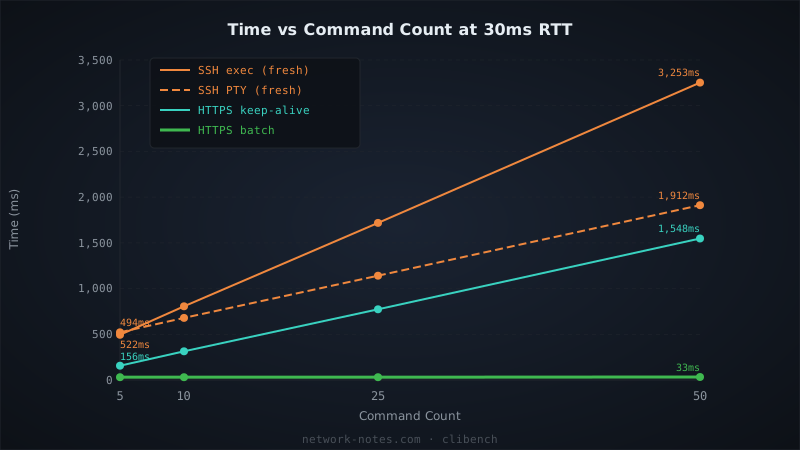
The advantage grows with command count, for per-command modes. At 30ms RTT with 50 commands, SSH exec fresh-conn takes 3,253ms. SSH PTY fresh takes 1,912ms (PTY avoids per-command channel overhead but pays per-command echo verification). HTTPS keep-alive takes 1,548ms. But HTTPS batch takes just 33ms. A ~99x improvement over exec fresh and ~58x over PTY fresh. SSH batch-exec shows the same flat scaling (~250ms regardless of command count), confirming this is a property of batching, not the transport.
What This Means at Scale
If you’re managing 100 devices serially (worst case, no concurrency), using PTY mode (what Netmiko/Ansible actually do):
| Profile | RTT | SSH PTY fresh (total) | HTTPS batch (total) | Time saved |
|---|---|---|---|---|
| regional | 30ms | 52s | 3.1s | 49s |
| continental | 70ms | 121s (2.0 min) | 7.4s | 114s |
| intercontinental | 150ms | 257s (4.3 min) | 15s | 242s (4.0 min) |
Concurrency shrinks the wall time, but the per-device cost stays the same. At 150ms RTT with 10 concurrent workers against 1,000 devices, SSH PTY takes ~4.3 minutes of wall time. HTTPS batch takes ~15 seconds.
Limitations
This benchmark measures transport overhead, not device processing time. Real network devices add their own latency to command execution: parsing the command, generating output, writing to the terminal. That cost is the same regardless of transport, so it doesn’t affect the relative comparison.
The HTTPS server uses a self-signed certificate with no session resumption. TLS 1.3 0-RTT resumption would make the HTTPS numbers even better on repeated connections, but I didn’t implement it because most device management scenarios don’t maintain long-lived TLS sessions.
A -userspace flag is available as a fallback for environments where root isn’t available, but it under-counts SSH round trips due to write coalescing in Go’s crypto/ssh. The published numbers all use tc netem.
What’s Next
In Part 3, I’ll look at what happens when you can’t change the device: the proxy pattern. Move SSH to the edge, talk HTTPS over the WAN, and capture most of the improvement without touching a single device config.
The benchmark code already supports proxy mode. Try it yourself and see what your numbers look like.