
CLI Over HTTPS Part 3: The Proxy Pattern
Table of Contents
In Part 1 I showed that SSH burns 10-15 round trips before delivering a single byte of command output. In Part 2 I proved it. HTTPS batch is ~17x faster than SSH at real-world latencies when the device supports it natively. Even HTTPS keep-alive, with no batching, is 3.4x faster.
The obvious objection: most devices don’t support it natively. Your Cisco IOS switches, your Juniper routers, your Arista leaf nodes, they speak SSH. And while some of them have other interfaces, SSH is not changing anytime soon.
So the question isn’t “how do I get my switches to speak HTTPS.” The question is: where does the SSH happen?
There are two answers. The proxy requires your automation to speak HTTPS, but it’s architecturally simple: one hop, one translation. The tunnel keeps SSH on both ends and optimizes only the WAN segment, so existing tooling works unchanged. Both relocate the expensive SSH round trips to a local link where they cost almost nothing.
The Proxy: Replace SSH on the WAN
SSH is slow because of round trips. Round trips are slow because of distance. If you move the SSH session closer to the device, the round trips get cheap.
A proxy co-located with the devices, in the same data center or local network, talks SSH to the devices over a 1-2ms link where the protocol overhead is negligible. Your automation platform talks HTTPS to the proxy over the WAN, where the round-trip savings from Part 1 actually matter.
The device never knows the difference, it sees an SSH session from a local IP. Your automation never touches SSH directly, it sends an HTTP request and gets CLI output back in the response body.
The Architecture
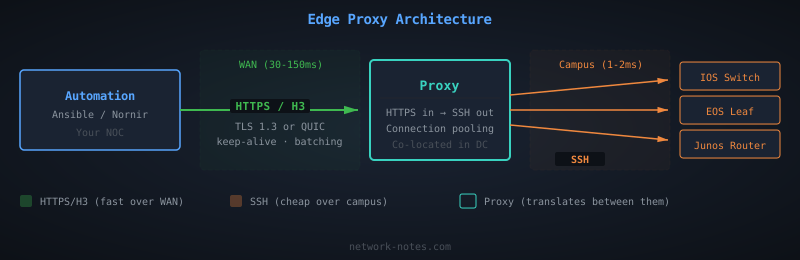
The proxy is the only component that touches SSH. Everything upstream is HTTPS: connection pooling, TLS 1.3, request batching, proper Content-Length framing. Everything downstream is SSH, but over a link where it doesn’t matter.
Proving It
I added a proxy mode to the benchmark tool from Part 2. The proxy is an HTTPS server that receives commands via the same ASA-style endpoints (/admin/exec/, /admin/config), then opens an SSH session to a backend device and returns the output.
The test setup:
- Backend device: SSH listener with 2ms RTT (local latency)
- Proxy: HTTPS frontend with WAN latency, SSH client to backend
- Benchmark client: Talks HTTPS to the proxy, same as it would to a native HTTPS device
Four proxy modes tested with a new WAN connection per request (cold start, first request of an automation run):
- fresh-ssh: New WAN connection + new SSH to backend per request
- pooled-ssh: New WAN connection, reuses one SSH connection on the backend
- h3-fresh-ssh: Same as fresh-ssh, but the WAN leg uses HTTP/3 (QUIC)
- h3-pooled-ssh: QUIC on WAN, pooled SSH on backend
Plus two connection-reuse modes (steady state, what a running automation platform does):
- keep-alive: Persistent HTTPS connection to proxy, pooled SSH on backend
- h3-keep-alive: Persistent QUIC connection to proxy, pooled SSH on backend
The proxy’s WAN-facing listener gets the same latency injection as the direct SSH and HTTPS tests from Part 2. The backend SSH link gets a fixed 2ms RTT. All transports experience the same WAN conditions. The only difference is what happens on the last hop.
Results
All runs: 20 iterations, 5 commands per iteration (batched in one POST). SSH direct numbers from Part 2 for comparison. The “SSH direct” column uses PTY/shell mode, what Netmiko and Ansible actually do.
| WAN RTT | SSH direct (PTY) | Proxy (new conn) | Proxy (reused conn) | Speedup (reused vs SSH PTY) |
|---|---|---|---|---|
| 30ms | 528ms | 124ms | 56ms | 9.4x |
| 70ms | 1,208ms | 248ms | 95ms | 12.7x |
| 150ms | 2,571ms | 489ms | 175ms | 14.7x |
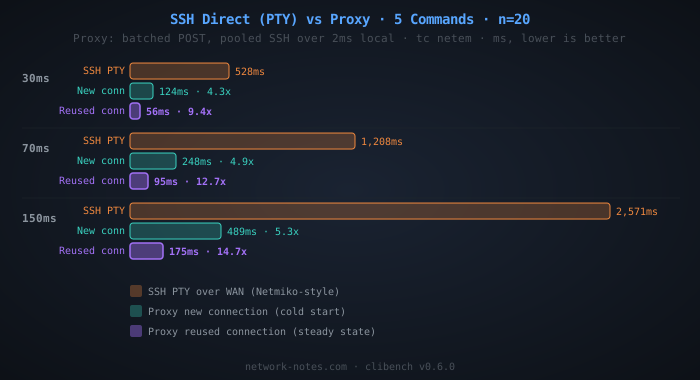
The new-connection proxy (full TLS handshake per request) is 4.3-5.3x faster than SSH direct. With connection reuse, the proxy hits 9.4-14.7x, and the advantage grows with latency because reusing the connection eliminates the TLS handshake entirely, paying only 1 round trip per request.
At 150ms RTT (a US NOC managing devices in Hong Kong) SSH direct (PTY) takes 2.6 seconds per device. The proxy with a persistent connection does it in 175ms.
Why It Works
SSH direct (PTY mode) at 150ms RTT pays the full protocol tax on every round trip over the WAN:
- TCP handshake: 1 RT × 150ms
- SSH version exchange: 1 RT × 150ms
- Key exchange: 2 RT × 150ms
- Auth + channel + PTY + shell: 4 RT × 150ms
- Session prep: 2 RT × 150ms
- 5 commands with echo verification: 5 RT × 150ms
That’s ~15 round trips × 150ms = ~2,250ms of protocol overhead, plus processing time.
The proxy with a new connection splits that cost across two links:
- WAN leg (HTTPS, new connection): TCP + TLS 1.3 + HTTP request = ~3 RT × 150ms = ~450ms
- Local leg (SSH): The same ~15 SSH round trips, but at 2ms = ~30ms
Total: ~480ms. That’s the cold-start cost when your automation opens a new connection to the proxy.
The proxy with a reused connection eliminates the handshake entirely:
- WAN leg (HTTPS, reused connection): HTTP request/response = ~1 RT × 150ms = ~150ms
- Local leg (SSH): Same ~30ms
Total: ~180ms. Measured: 175ms.
This is the steady-state performance. Once your automation has an open connection to the proxy (which any HTTP client maintains by default), every subsequent request costs exactly one WAN round trip plus the local SSH work. The SSH overhead is still there. It’s just happening on a link where 15 round trips cost 30ms instead of 2,250ms.
Fresh vs Pooled: Does It Matter?
At local latency, not much. The gap between fresh-ssh (132ms) and pooled-ssh (119ms) at 30ms WAN RTT is 13ms, the cost of one SSH handshake at 2ms RTT. In production you’d pool connections anyway for resource efficiency, but the performance argument for pooling is modest when the backend latency is low.
The operational argument matters more. A pooled connection means fewer SSH sessions on the device, and Network devices have finite session limits. An ASA might handle 5 concurrent SSH sessions, a catalyst might allow 16. If your proxy is serving 50 requests per second, fresh connections will exhaust those limits instantly. Pooling keeps one session open per device and multiplexes commands through it.
The pooling logic in clibench is simple.
getSSH() returns an existing connection if one is pooled, or dials a new one:
| |
The tradeoff is stale connections; devices reboot, sessions time out, firewalls drop idle flows. The proxy needs to detect dead connections and reconnect, the same problem as HTTP connection pooling or database connection pooling. In clibench, a failed session operation clears the pool so the next request gets a fresh connection. In production, you’d add periodic health checks and a circuit breaker for unreachable devices; which is what NAAS does, for example.
The Tunnel: Keep SSH on Both Ends
The proxy requires changing your automation client. What if you can’t?
Many teams have years of Ansible playbooks, Nornir scripts, and Netmiko wrappers that all speak SSH. Rewriting them to speak HTTPS is a project, not a config change. The tunnel solves this: both your automation and the device speak SSH. The WAN segment in between uses HTTPS or HTTP/3, but neither endpoint knows or cares.
Architecture
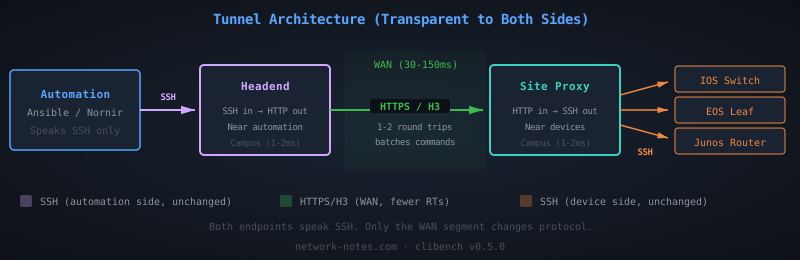
The headend sits near your automation server. It accepts SSH connections, parses the exec command, and forwards it as an HTTP request over the WAN to the site proxy. The site proxy is the same component from the proxy pattern above. It receives the HTTP request and talks SSH to the device on a local link.
Your automation runs ssh headend "show version" and gets back the device output. Under the hood, the WAN segment used HTTPS with 2-3 round trips instead of SSH’s 15+.
Results
| WAN RTT | SSH direct (PTY) | Tunnel (per-cmd) | Tunnel (batch) | Speedup (batch vs SSH PTY) |
|---|---|---|---|---|
| 30ms | 528ms | 228ms | 82ms | 6.4x |
| 70ms | 1,208ms | 429ms | 121ms | 10.0x |
| 150ms | 2,571ms | 856ms | 202ms | 12.7x |
Two things jump out.
Without batching, the tunnel is slower than the proxy. The per-command tunnel mode (ssh-https-ssh) pays SSH overhead on both ends: the automation-to-headend SSH handshake, plus the site proxy-to-device SSH handshake. That’s two sets of SSH round trips at campus latency (~2ms each), plus the WAN HTTP request per command. At 150ms, 856ms is still 3.0x faster than SSH direct, but much worse than the proxy’s 175ms.
With batching, the tunnel approaches proxy performance. The batch mode sends all 5 commands in a single SSH exec payload to the headend. The headend forwards them as one HTTP POST. The site proxy runs them all in one SSH session. At 150ms, that’s 202ms vs the proxy’s 175ms. The tunnel pays a small penalty for the extra SSH hop on the automation side, but it’s close.
The tunnel’s value isn’t raw speed. It’s that you get 12.7x improvement with zero changes to your automation code or your devices.
Proxy vs Tunnel: When to Use Which
Use the proxy when you can modify your automation to speak HTTPS. It’s faster (14.7x with connection reuse vs 12.7x for the tunnel), simpler (one hop instead of two), and has lower per-request overhead.
Use the tunnel when you can’t change the automation client. If your tooling must speak SSH (connection plugins, credential management, or organizational inertia) the tunnel gives you WAN optimization transparently. The batch mode requires that your SSH client sends multiple commands in one exec call (which tools like ssh host "cmd1 && cmd2" do naturally), but even per-command mode is 3.0x faster than SSH direct at high latency.
Use both in a migration. Deploy the tunnel first for immediate wins with no code changes, then migrate automation to speak HTTPS to the proxy directly as you refactor.
What This Looks Like in Practice
If you have an internal API that accepts “run this command on this device” requests and returns the output, you’re already running a version of this.
Examples in the ecosystem:
- Salt proxy minions with NAPALM behind the Salt REST API
- AWX execution environments co-located with devices
- Oxidized’s web interface
- The Rackspace Go microservices from Part 1
- NAAS (Netmiko as a Service): wraps Netmiko behind a REST API with connection pooling, async jobs, and circuit breakers
Most of these co-locate SSH with the devices (good), but don’t expose a clean HTTPS interface upstream, or they bury it under job queues, inventory sync, and YAML sprawl. The core pattern is simpler than any of those tools. The proxy in clibench proves the concept in ~180 lines of Go. A production deployment adds multi-vendor support, health checks, and credential management on top.
Security
The proxy doesn’t make things more or less secure. It changes the trust model.
With SSH direct, your automation server holds the SSH keys and authenticates directly to every device. With the proxy pattern, the trust boundary splits in two: your automation authenticates to the proxy (over HTTPS, using API tokens, mTLS, or whatever your org uses for service-to-service auth), and the proxy authenticates to the devices (over SSH, using keys that are available to the proxy itself).
What actually changes:
- Where the SSH keys live. They move from the automation server to the proxy. The private keys never cross the WAN in either model (SSH public key auth sends a signature, not the key), but the proxy pattern puts the keys physically closer to the devices they unlock.
- The WAN-side auth mechanism. Your automation no longer speaks SSH to devices. It speaks HTTPS to the proxy. That’s not inherently better or worse. It’s a different credential type (API token or client cert vs SSH key) managed through whatever system your organization already runs for service authentication.
- The blast radius of a compromised proxy. The proxy has access to the SSH keys for every device it manages. Compromise the proxy, and you have access to the fleet. This is the same risk profile as an SSH bastion host, which most organizations already operate and already know how to harden: minimal attack surface, restricted network access, key rotation, session logging, and monitoring. The proxy deserves the same care you’d give a bastion.
When the Proxy Doesn’t Help
The proxy pattern assumes the WAN latency between your automation and the devices is the bottleneck. If your automation server is already co-located with the devices (same rack, same DC), there’s no WAN leg to optimize. SSH at 1-2ms RTT is fast enough.
It also doesn’t help if your bottleneck is device processing time rather than transport overhead. If a show tech-support takes 30 seconds to generate on the device, the transport saves you a few hundred milliseconds on a 30-second operation. Still worth it at scale, but the relative improvement is smaller.
And the proxy adds operational complexity. It’s another service to deploy, monitor, and maintain. For a team managing 50 devices in one location, the overhead isn’t justified. For a team managing thousands of devices across multiple continents, which is where SSH overhead actually hurts, the proxy pays for itself on the first automation run.
Try It
The benchmark code includes all modes. Run it yourself:
| |
In Part 4, I’ll lay out a decision framework for choosing between SSH direct, a proxy, a tunnel, and native HTTPS, and dig into NAAS as a production deployment of the proxy pattern.
My take: The proxy pattern isn’t a workaround. It’s the right architecture for managing geographically distributed network infrastructure. SSH is fine for the last hop. HTTPS (or QUIC) is better for everything upstream.